
ConjureAlign
Key Features
- Automatic cross-correlation capture measures the offset between a track and a sidechain reference
- Sub-sample alignment shifts reduce comb filtering from multi-mic distance differences
- Automatic polarity detection can flip a mic relationship when the captured signals require it
- Latency compensation supports negative shifts when the target track needs to move earlier
- Click-free gliding applies new alignment settings smoothly during playback
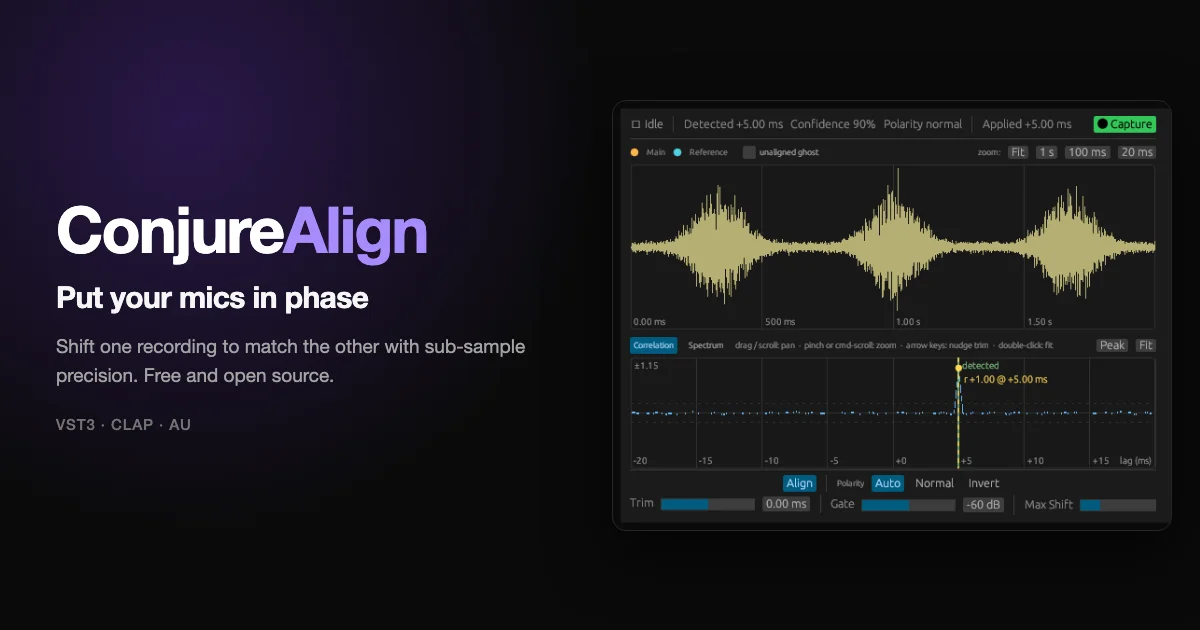
- Overlay and correlation displays show the captured waveforms, detected peak, confidence, and applied shift
- Manual trim adds fine adjustment on top of the detected alignment for mix-by-ear correction
Description
ConjureAlign is a time-alignment plugin for matching two microphones recorded from the same source, such as a close mic and a room mic on a guitar amp or drum kit. It compares the main signal against a sidechain reference, finds the timing offset, and shifts the target track with sub-sample precision to reduce phase cancellation and comb filtering.
The workflow is built around capture rather than manual waveform nudging. Insert the plugin on the track that needs to move, route the reference mic into the sidechain input, play a representative section, then click Capture so the plugin measures the offset and applies the correction.
ConjureAlign also handles polarity decisions, latency compensation for negative shifts, and click-free movement when the alignment changes during playback. Its editor shows overlaid captured waveforms, a cross-correlation curve, the detected peak, confidence feedback, and a manual trim control for fine-tuning.
The official ConjureDSP page identifies ConjureAlign as GPL-3.0 open source and points users to the public GitHub release page for downloads. Current release notes list signed and notarized macOS builds for VST3, CLAP, and Audio Unit, plus a beta Windows ZIP with VST3 and CLAP builds.
Video Preview

Frequently Asked Questions
How does ConjureAlign know which track to move?
You place ConjureAlign on the track that should be shifted, then route the reference mic into the plugin's sidechain input. When Capture is triggered, the plugin compares those two signals and stores the measured alignment with the session.
Can ConjureAlign move audio earlier, not just later?
Yes. The developer documents support for negative shifts through latency compensation, so the plugin can report latency to the host when the aligned track needs to move earlier relative to the reference.
Does ConjureAlign only work automatically?
No. The plugin is designed around automatic capture, but it also includes manual trim for adding small timing adjustments after the detected offset.
What happens if the two signals do not correlate?
The GitHub guide says captures made during silence, or from signals that do not actually correlate, are rejected and the previous alignment is kept. That makes it important to capture a loud, representative part of the performance.


