
Phase Align
Key Features
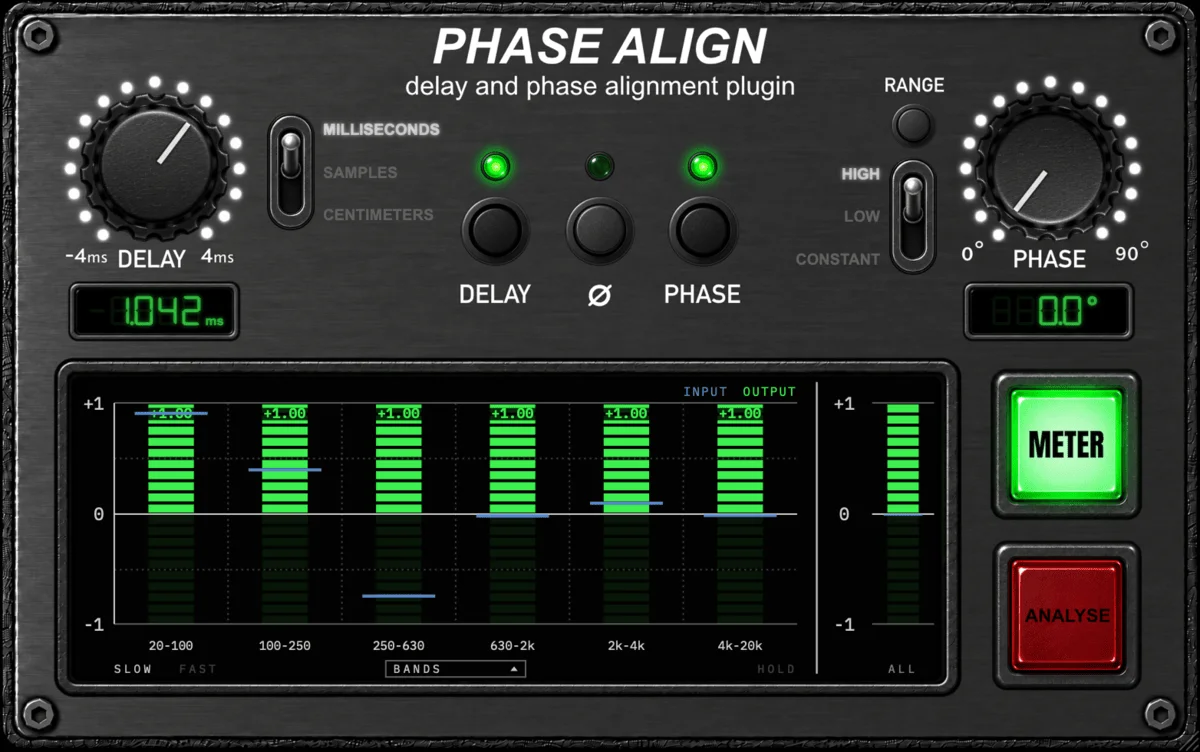
- Sub-sample delay moves a track from -4 to +4 ms for close-mic, room-mic, DI, and amp alignment
- Polarity inversion and phase rotation work together to correct broadband or frequency-dependent cancellation
- LOW and HIGH all-pass modes place the phase turn in different frequency regions, while CONSTANT applies the same angle across the band
- RANGE expands the phase section from finer control to wider rotation without losing the knob position
- BANDS, VECTORSCOPE, and ALIGNMENT views compare the processed track against a sidechain reference
- SLOW, FAST, HOLD, and captured-transient tools support deliberate visual adjustment instead of chasing moving displays
- ANALYSE captures both signals and proposes delay, polarity, and phase settings to audition by ear
Description
Phase Align is a phase and time alignment utility for bringing two recordings of the same source into closer agreement, such as a close and room microphone, DI and amp, or top and bottom snare mics. It combines sub-sample delay, polarity inversion, and phase rotation so you can correct a simple arrival-time mismatch or work on a more frequency-dependent relationship.
The delay control moves the processed track from -4 to +4 ms in 0.1-sample steps, while the phase section offers low- and high-focused all-pass modes plus a constant phase-rotation mode. RANGE expands the available rotation, and the plugin reports its latency to the host so sessions can compensate for settings that move material earlier.
Phase Align is designed to make those choices visible as well as audible. Its meter can compare the track to a sidechain reference through six correlation bands, a vectorscope, or overlaid transient waveforms, with slow and fast averaging plus a hold function for inspecting a result.
For a quicker starting point, ANALYSE listens to both signals and suggests delay, polarity, and phase settings; the developer still recommends auditioning the suggestions. The public AGPL-3.0 project ships AU and VST3 builds for current macOS, Windows, and Linux workflows, and its official release page supplies the platform installers and archives.
Frequently Asked Questions
What should I feed into Phase Align's sidechain?
Route the related reference track into the sidechain input and insert Phase Align on the track you want to move. The meter and ANALYSE function compare the processed track with that reference, so both should capture the same source.
Should I set delay or phase first?
The developer's quick-start guidance is to set the delay first, then evaluate phase and polarity. Time correction addresses the broad arrival offset, while phase rotation can refine relationships that still vary by frequency.
When should I use the constant phase mode?
CONSTANT rotates all frequencies by the same angle, unlike the all-pass modes whose phase shift changes across the spectrum. It adds substantially more reported latency than the HIGH and LOW modes, so it is a deliberate trade-off when a broadband rotation is appropriate.
Does ANALYSE replace listening by ear?
No. ANALYSE proposes settings from the captured material, but the developer describes those results as suggestions to compare by ear. It needs both tracks playing together, with at least 10 seconds of representative audio and about 30 seconds preferred.


