
cStop
Key Features
- Start, Stop, and Bypass modes for tape-style pitch-up and pitch-down transitions
- Mode parameter can be automated to place effects directly on the DAW timeline
- Separate start and stop behavior for dialing in different ramp shapes
- Host-synced timing support for musical transition lengths
- Auto Bypass can return the plugin to bypass after the motion completes
- Built-in multimode filtering for tonal shaping around the tape movement
Description
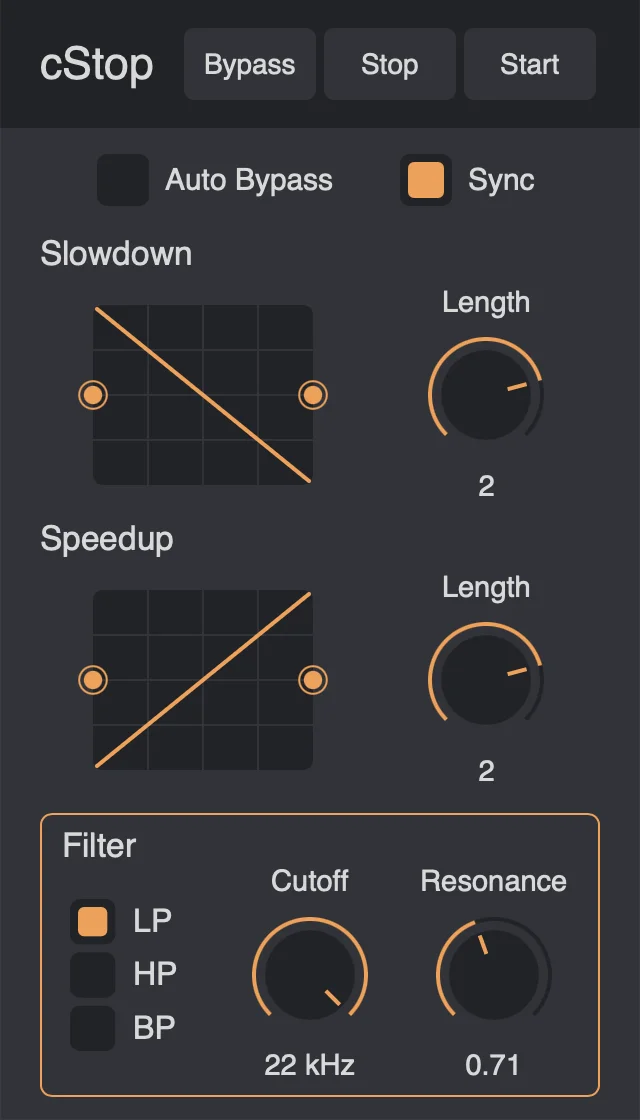
cStop is a tape stop and tape start effect plugin for Mac and Windows that focuses on fast, automatable pitch-motion transitions. It gives producers a simple way to trigger slow-down, speed-up, and bypass states without loading a larger glitch or multi-effect processor.
The main workflow centers on automating the Mode parameter, so drops, breakdowns, edits, and one-shot transport effects can be placed directly on the DAW timeline. Version 2 adds a modern WebView interface, rewritten DSP, and an Auto Bypass option that returns the plugin to bypass after the motion completes.
For deeper shaping, cStop lets you adjust start and stop behavior separately instead of using one shared timing control. The reviewed build also includes host-synced timing, curve control, and a multimode filter for high-pass, low-pass, or band-pass tone shaping around the pitch movement.
The best fit is deliberate transition design rather than complex rhythmic mangling. A noted limitation is that Start mode ramps pitch upward from a slow start, so it may not stay locked to real time until the plugin returns to bypass.
Video Preview

Frequently Asked Questions
What is the main control to automate in cStop?
The developer recommends automating the Mode parameter. That lets you switch between Start, Stop, and Bypass at specific points in your DAW arrangement.
What changed in cStop version 2?
Version 2 introduced rewritten DSP, a modern WebView interface, and Auto Bypass. The developer notes that v2 is not compatible with projects saved using v1, so older sessions may need the v1.0.1 release.
Can cStop do more than a basic slow-down effect?
Yes. In addition to tape stop and start movement, the reviewed build includes independent start and stop shaping plus a multimode filter for high-pass, low-pass, or band-pass tone changes.
Is cStop better for transitions or detailed glitch sequencing?
It is best suited to direct transport-style transitions. For elaborate stutter sequencing, multiband time manipulation, or drawn modulation curves, a larger paid multi-effect will offer more control.


