
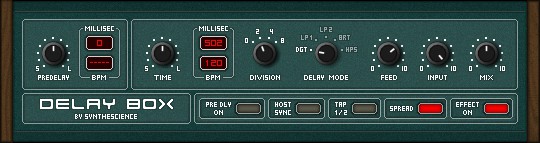
Delay Box
Key Features
- Five delay modes covering digital clarity, analog BBD warmth, tape echo grit, and a switchable pre-delay mode for rhythmic patterns
- Stompbox-style interface blended with rack processor features for quick, intuitive operation
- Full parameter automation for dynamic delay changes during mixing and production
- 64-slot preset memory with factory presets included to demonstrate each mode's capabilities
- Analog and tape modes deliver saturated, degrading repeats reminiscent of vintage hardware echo units
- Lightweight footprint at just 1.6 MB with simple drag-and-drop DLL installation
Description
Delay Box by Synthescience is an analog and digital style delay plugin built around a stompbox-inspired interface with rack-processor versatility. It covers five distinct delay modes spanning crisp digital repeats, warm analog bucket brigade device emulation, and gritty tape-style echo, plus a switchable pre-delay mode for extended rhythmic patterns.
The plugin strikes a deliberate balance between simplicity and depth, packing enough controls to shape detailed echo textures without overwhelming the user. Each mode imparts a noticeably different tonal character, from the pristine clarity of the digital setting to the saturated, degrading repeats of the tape and BBD algorithms.
Full automation support makes Delay Box practical for session work where delay parameters need to change dynamically across a mix. The built-in preset system stores up to 64 user patches, and the plugin ships with several factory presets that demonstrate the range of each mode.
Users have praised Delay Box for its versatile sound palette and the way it sits naturally in a mix, particularly on vocals, guitars, and synth pads. The analog and tape modes deliver the kind of warm, dubby character that is typically associated with more expensive vintage echo emulations.
Built with SynthEdit, the plugin runs as a 32-bit VST on Windows and installs by simply copying the DLL into your VstPlugins folder. The download weighs in at approximately 1.6 MB, making it one of the lightest delay options available.
Video Preview

Frequently Asked Questions
What delay modes does Delay Box include?
Delay Box offers five modes: Digital for clean and precise repeats, two analog BBD modes for warm bucket brigade character, a tape mode for saturated vintage-style echo, and a switchable pre-delay mode designed for extended rhythmic delay patterns.
Can Delay Box parameters be automated in a DAW?
Yes, Delay Box is fully automatable. All parameters can be controlled via your DAW's automation lanes, which is useful for creating dynamic delay throws, tempo-synced transitions, and evolving echo textures within a mix.
Does Delay Box work in 64-bit DAWs?
Delay Box is a 32-bit VST plugin. To run it in a 64-bit DAW, you will need a bridging tool such as jBridge or 32 Lives that allows 32-bit plugins to load inside 64-bit host applications.
How do I install Delay Box?
Installation is straightforward. Unzip the download, then copy the DLL files into your DAW's VstPlugins folder. No installer or registration is required.


