Elemental Player
Key Features
- Sample-based instrument player with an organized library browser for all installed Elemental instruments
- Individual reverb, dynamics, and ADSR envelope controls per loaded instrument for shaping tone and response
- MIDI channel routing for layering multiple instruments together or playing them independently
- Built-in transpose function for one-click pitch shifting of any loaded instrument
- Native Apple Silicon support alongside Intel and AMD processors on both macOS and Windows
- Standalone application mode for performing and composing outside of a DAW environment
- Ships with a multi-sampled Felted Piano library recorded at multiple dynamic levels
Description
Elemental Player by Organic Instruments is a sample-based virtual instrument player designed for composing and performing with multi-sampled instrument libraries. It hosts instruments built with the companion Elemental Studio software and ships with a Felted Piano library that uses thick felt layers between string and hammer for a wistful, melancholic tone.
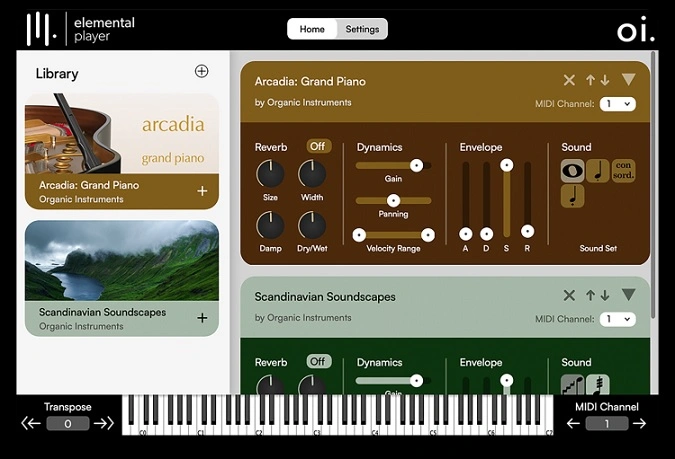
Each loaded instrument gets its own reverb, dynamics, and ADSR envelope controls. The dynamics section covers gain, panning, and velocity range adjustments, giving you precise control over how every instrument responds to your playing.
MIDI channel routing enables flexible layering and separation. Assign multiple instruments to the same channel to build polyphonic textures, or spread them across different channels for independent playback from one unified interface.
The browser-style layout shows installed libraries on the left and loaded instruments on the right, keeping navigation fast during sessions. A built-in transpose function lets you pitch-shift any instrument with a single click.
Elemental Player runs as VST3, AU, AAX, or standalone on Windows 7+ (64-bit) and macOS 10.13+ with native Apple Silicon support. The base installation is approximately 400 MB and no activation is required.
Video Preview

Tips
- Experiment with the built-in reverb, dynamics, and ADSR envelope controls to shape your sound.
- Experiment with the built-in reverb, dynamics, and ADSR envelope controls to shape your sound.
- Assign different instruments to specific MIDI channels to create complex, layered textures.
- Use the transpose function to easily pitch-shift instruments with a single click.
- Take advantage of the intuitive interface to quickly navigate through your instrument library.
- Utilize the free Felted Piano instrument to explore the potential of the Elemental Player before creating your own instruments.
- Layer multiple instruments by assigning them to the same MIDI channel for rich, polyphonic textures.
- Regularly check for new instrument libraries created by other publishers to expand your sound palette.
- Assign different instruments to specific MIDI channels to create complex, layered textures.
- Use the transpose function to easily pitch-shift instruments with a single click.
- Take advantage of the intuitive interface to quickly navigate through your instrument library.
- Utilize the free Felted Piano instrument to explore the potential of the Elemental Player before creating your own instruments.
- Layer multiple instruments by assigning them to the same MIDI channel for rich, polyphonic textures.
- Regularly check for new instrument libraries created by other publishers to expand your sound palette.
Frequently Asked Questions
What instruments are available for Elemental Player?
Elemental Player ships with a Felted Piano library that was individually sampled at multiple dynamic levels. Organic Instruments has since released additional libraries including Glockenspiel and Ukulele, and third-party developers can create their own instruments using Elemental Studio.
How does Elemental Player compare to Kontakt Player?
Both are sample-based instrument hosts, but they serve different ecosystems. Kontakt Player accesses the massive Kontakt library catalog, while Elemental Player runs instruments built specifically with Elemental Studio. Elemental Player is lighter weight at around 400 MB and requires no activation.
Does Elemental Player require iLok or any activation?
No, the player itself and the included Felted Piano run without any activation or iLok authorization. The installer includes iLok License Manager for managing paid third-party instrument libraries, but this is optional.
Can I create my own instruments for Elemental Player?
Yes, the companion Elemental Studio software lets you design, build, and publish sample-based virtual instruments in VST3, AU, AAX, and standalone formats. Instruments you create can be shared with anyone running Elemental Player.