Freezechamber
Key Features
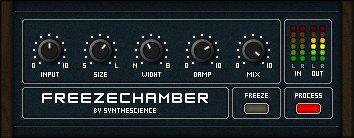
- Freeze switch captures and sustains the reverb tail indefinitely for drone and pad creation
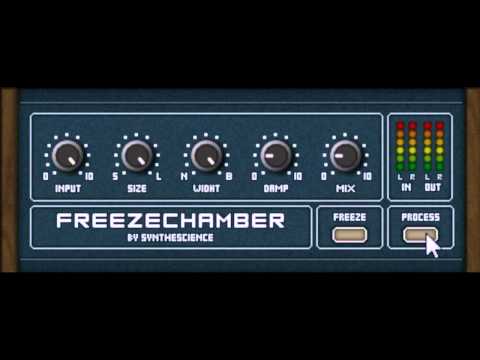
- Simple three-knob interface with input level, room size, and diffusion width controls
- Full parameter automation support for dynamic freeze effects and evolving textures
- Internal preset manager with 64 slots and factory presets included
- Lightweight CPU footprint suitable for use on multiple tracks simultaneously
- Capable of producing everything from subtle room ambience to expansive frozen soundscapes
- Made with SynthEdit for reliable Windows VST compatibility
Description
Freezechamber by Synthescience is an algorithmic reverb plugin built around one compelling idea: the ability to freeze your reverb tail on command. It delivers straightforward spatial processing with controls for input level, room size, and diffusion width, making it easy to dial in anything from tight reflections to expansive washes.
The signature Freeze switch captures the current reverb state and suspends it indefinitely, producing evolving drone-like textures and sustained pads from any input signal. This makes it a powerful sound design tool that goes well beyond standard reverb duties.
All parameters are fully automatable, which opens up creative possibilities when the Freeze function is mapped to a MIDI controller or drawn as automation curves in your DAW. The plugin stores up to 64 presets and ships with several factory patches that demonstrate its range from subtle room ambience to otherworldly frozen soundscapes.
Built with SynthEdit, Freezechamber has earned a loyal following among producers who value its simplicity and the unique tonal character of its freeze mode. Users praise it as both a practical reverb for everyday mixing and an inspiring texture generator for ambient and experimental work.
The plugin is available as a 32-bit VST for Windows. Installation is straightforward: extract the ZIP and copy the DLL files into your VST plugins folder.
Video Preview
Frequently Asked Questions
How does the Freeze function work in Freezechamber?
When you engage the Freeze switch while audio is passing through the reverb, it captures the current reverb tail and holds it in a sustained, infinite loop. The result is a continuous tonal wash that can resemble a synth pad or drone texture, which you can then manipulate by automating the Freeze on and off.
Can I use Freezechamber in a 64-bit DAW?
Freezechamber is a 32-bit VST plugin, so you will need a bridging tool like jBridge to run it inside a 64-bit DAW. Many users report success with this approach, though native 64-bit performance is not available.
What creative techniques work well with Freezechamber?
The most popular technique is automating the Freeze switch to capture specific moments in a performance, creating evolving ambient beds and transition effects. You can also use it to build risers and atmospheric pads by freezing a short burst of audio and letting the sustained reverb tail carry the texture.
Who developed Freezechamber?
Freezechamber was created by Synthescience, a developer known for releasing a collection of 18 freeware VST effect plugins for Windows. The developer's original website is no longer active, but the plugin remains available through various plugin archives.