
Key Features
- Automatic chromatic note detection for instrument tuning
- Displays the nearest Western scale note
- LED-style indicators show whether a note is flat or sharp
- Numerical frequency readout in hertz
- Cents display supports fine tuning against the detected note
- Adjustable reference frequency for alternate tuning standards
Description
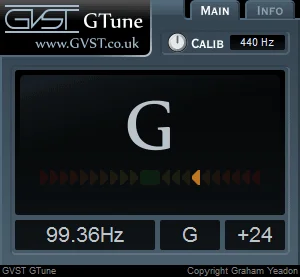
GTune by GVST is a chromatic instrument tuner that detects the pitch of an incoming note and displays the nearest note in the Western scale. It gives guitarists and other musicians a visual reference for tuning an instrument inside a VST host.
The main display identifies the detected note, while a row of LED-style indicators shows whether the signal is flat or sharp. The centre indicator lights when the pitch is close to the displayed note, providing a quick guide while adjusting a string.
A numerical readout shows the input frequency in hertz and the deviation from the target in cents. This lets you check the finer adjustment after using the indicator row to get close.
The reference frequency control changes the pitch assigned to A above middle C. GVST recommends leaving it at 440 Hz unless your tuning requires a different reference.
For more reliable tracking, GVST recommends a strong, clean input signal and suggests trying the neck pickup on a guitar. Avoid placing a noise gate before the tuner; the developer advises reducing noise at the source instead.
GTune is a focused tuning utility rather than an automatic pitch correction effect: you adjust the instrument yourself while watching the display. GVST provides the plugin through its product page, where you can choose the download appropriate to your system.
Frequently Asked Questions
Does GTune automatically correct an instrument’s pitch?
No. GTune detects and displays pitch so you can adjust the instrument yourself.
Can I change the tuning reference?
Yes. The reference frequency control sets the frequency of A above middle C; GVST recommends 440 Hz unless a different reference is needed.
How can I improve pitch tracking?
GVST recommends a strong, clean signal and suggests trying a guitar’s neck pickup. It also advises against using a noise gate to reduce noise before the tuner.
What do the indicators and cents readout show?
The indicators show whether the input is flat or sharp relative to the displayed note. The cents readout shows the deviation numerically for finer adjustment.


