Hardwave Analyser
Key Features
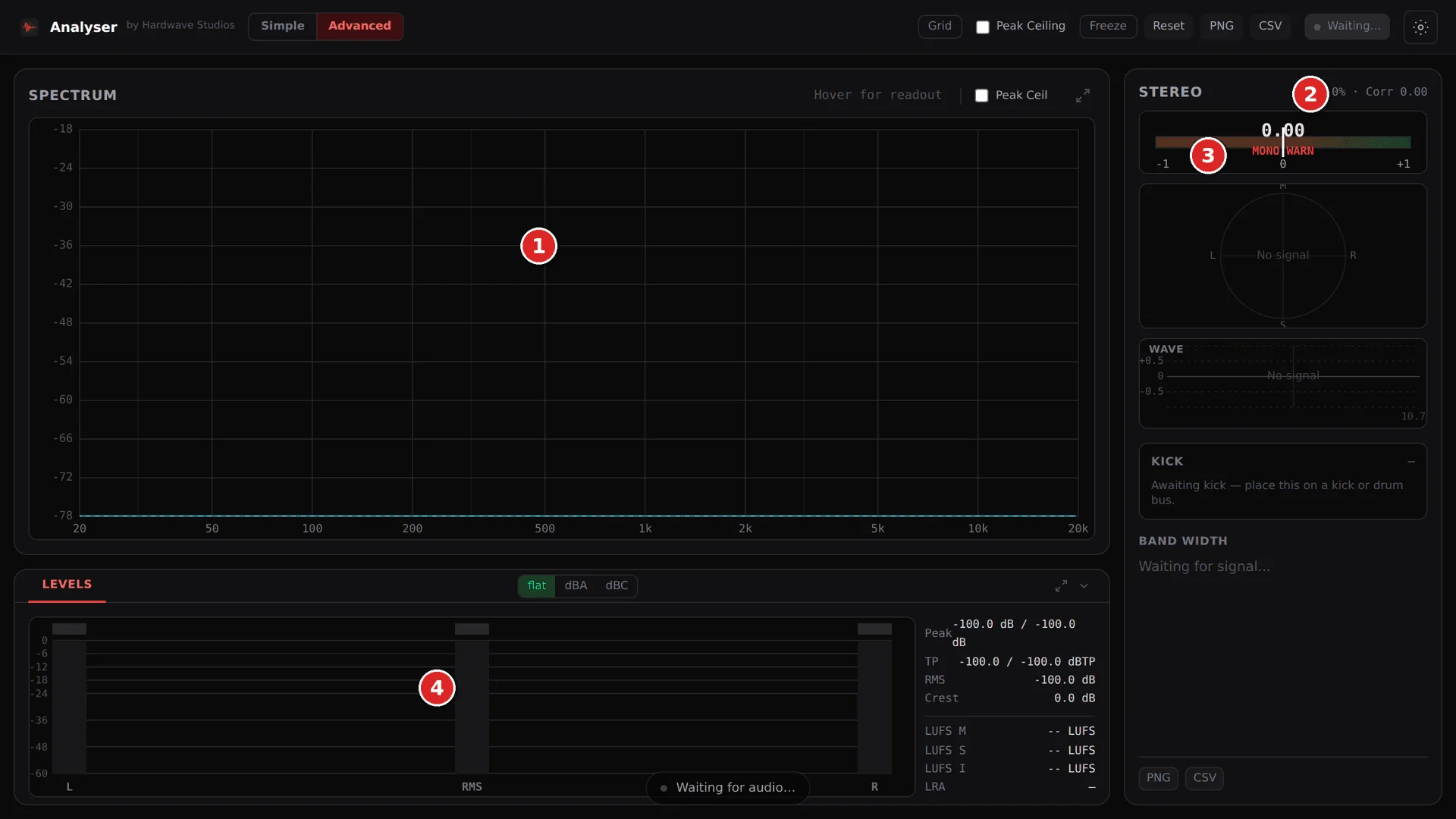
- 4096-point FFT spectrum view covers 20 Hz to 20 kHz across 256 log-spaced bands for a detailed overview of frequency balance.
- Phase correlation and per-band stereo-width metering help identify low-end width and mono-compatibility concerns.
- Per-channel peak and RMS metering separates transient spikes from sustained energy in the same view.
- True-peak detection, crest factor, and slow-decay peak hold add practical checks for kick, bass, and master-bus levels.
- Flat, -3 dB/oct, and -4.5 dB/oct tilt options combine with flat, A-weighted, and C-weighted display modes.
- The embedded interface works inside the plug-in window and has been tested in FL Studio, Ableton, Bitwig, and Reaper.
- Hardwave Suite installs and keeps the plug-in current rather than requiring separate per-format installers.
Description
Hardwave Analyser is a spectrum-analysis and metering plug-in built to make low-end, stereo, and level decisions easier inside a DAW. Its 4096-point FFT display covers 20 Hz to 20 kHz across 256 log-spaced bands, while the same window provides phase correlation, per-band stereo width, and peak/RMS readings.
The metering section adds true-peak detection, crest factor, and adjustable peak hold, so a kick, bass, or master bus can be checked for transient level and sustained energy without switching between utilities. Flat, -3 dB/oct, and -4.5 dB/oct tilt options, plus flat, A-weighted, and C-weighted views, make the spectrum readout adaptable to different sources and monitoring habits.
Its embedded webview interface stays inside the plug-in window rather than opening a separate analyzer panel. Hardwave lists FL Studio, Ableton, Bitwig, and Reaper among the tested DAWs, giving hardstyle, rawstyle, uptempo, and other bass-heavy producers a focused visual check before changing EQ, balance, or stereo processing.
Hardwave states that every feature is unlocked permanently, with no trial limits, watermarks, or in-plug-in upsell. Installation is handled by the Hardwave Suite; the product page says a Hardwave account is needed, so users should follow the developer's current setup flow rather than expect a standalone installer.
Frequently Asked Questions
What does Hardwave Analyser measure?
Hardwave Analyser combines a 4096-point spectrum display with phase correlation, per-band stereo width, peak, RMS, true-peak, crest-factor, and peak-hold metering. It is an analysis utility, so its role is to provide visual feedback while you make mix decisions with other processors.
Why is it aimed at kick and bass work?
The developer positions the plug-in around visibility below 150 Hz, where a kick's fundamental and the balance between sub, punch, and tail can be difficult to judge. Per-band stereo width and phase correlation also make it useful for checking that a bass-heavy mix remains mono-safe.
Which plug-in formats and platforms are supported?
Hardwave lists VST3 and CLAP formats for Windows and macOS. Linux support is described as coming, so it should not be treated as a current supported platform.
Do I need a Hardwave account to install Analyser?
The Analyser product page says it is free with a Hardwave account and includes a sign-in/create-account action. The Suite download page also says no account is required for the desktop app, so confirm the current account step in the Suite after installation.