

Key Features
- Shape low and high frequencies with two stepped cutoff switches
- Apply 12 dB-per-octave low- and high-cut filters
- Compare processed and unprocessed audio with the in switch
- Save and load presets and compare two settings with A/B controls
- Choose 2x, 4x or 8x oversampling and an optional HQ mode
- Undo and redo parameter changes from the bottom panel
Description
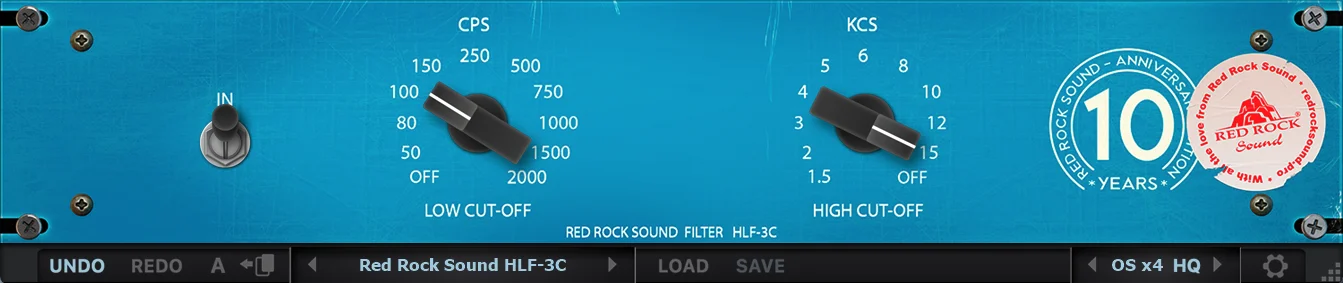
HLF-3C by Red Rock Sound is a passive-style high- and low-cut filter plugin for shaping the frequency extremes of a recording. Its two stepped controls make it useful for clearing rumble and excess top end or creating a narrow vintage-style effect.
The low-cut switch spans 50 Hz to 2 kHz, while the high-cut switch spans 1.5 kHz to 15 kHz. Each filter uses a 12 dB-per-octave slope, and an in switch lets you bypass the processing for comparison.
Unlike the original passive hardware, the plugin compensates for the inherent insertion loss when no filters are engaged. Choose cutoff positions by ear on individual instruments or subgroups, then compare the filtered and unfiltered signal with the bypass switch.
The bottom panel includes undo and redo, A/B settings and preset management. Oversampling can be set to 2x, 4x or 8x, with an additional HQ mode that increases CPU load.
HLF-3C is available for Windows and macOS in VST2, VST3 and AAX formats, with AU also available on macOS. The developer lists an internet connection for activation and notes that the software can be used offline after activation.
Frequently Asked Questions
What frequencies can the filters target?
The low-cut switch offers positions from 50 Hz to 2 kHz, and the high-cut switch covers 1.5 kHz to 15 kHz. Each uses fixed steps rather than a continuously variable cutoff.
Does the plugin reproduce the level loss of the passive hardware?
Red Rock Sound says the plugin compensates for the hardware’s inherent insertion loss. With neither filter engaged, the plugin has unity gain.
What does HQ mode change?
HQ mode adds a higher-order antialiasing filter for oversampling. The developer notes that it increases CPU load.
Does activation require an internet connection?
The developer lists an internet connection for plugin activation. It says you can go offline after activation is complete.


