
Lumen
Key Features
- Lens engine turns dropped PNG or JPEG images into playable wavetable material using Scan and Spectral modes
- Two wavetable oscillators with smooth frame morphing, plus sub oscillator, noise, and a drive-capable state-variable filter
- Four performance macros give every factory preset immediate Tone, Motion, Space, and Texture controls
- Deep editing view exposes three ADSR envelopes, three multi-wave LFOs, and a 24-slot modulation matrix
- Built-in drive, chorus, delay, reverb, limiter, and live spectral waterfall for shaping and monitoring patches
- 32 factory presets cover bass, leads, pads, keys, textures, and an init patch for building sounds from scratch
Description
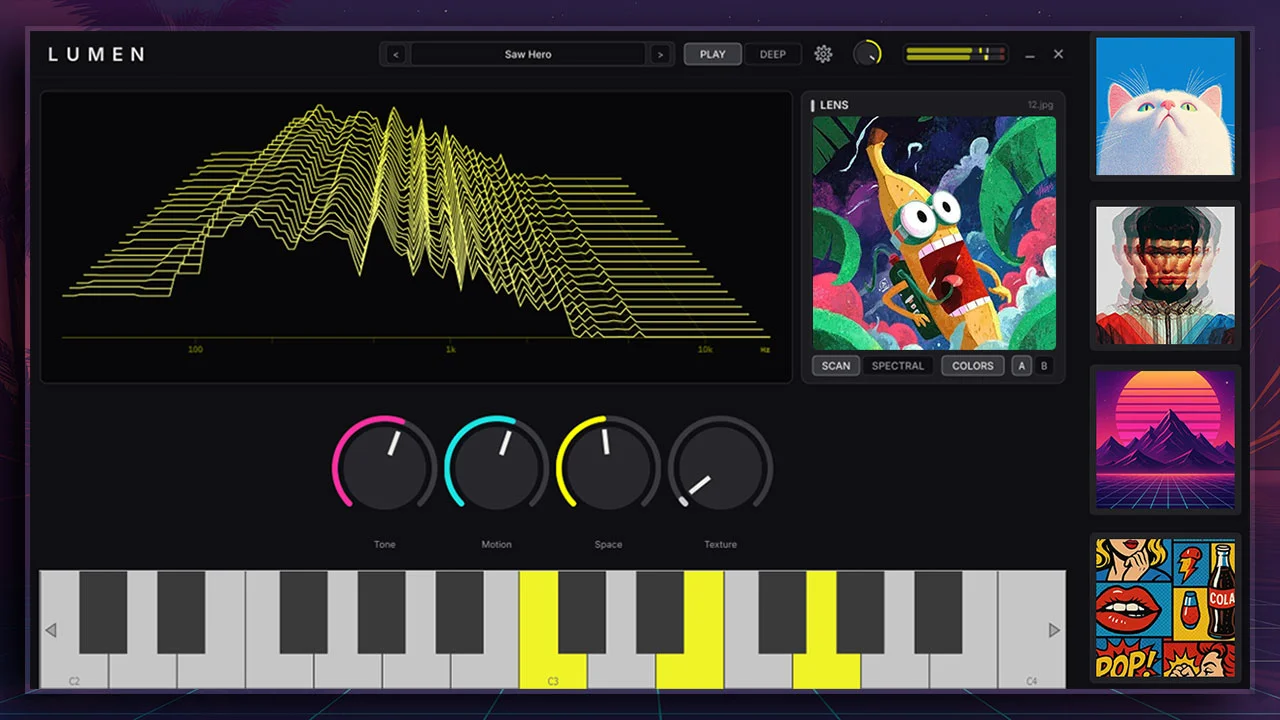
Lumen is a Windows wavetable synthesizer built around the Lens image-to-tone engine. Drop a PNG or JPEG onto the synth and it converts the image into a playable wavetable, with Scan and Spectral modes for different ways of reading the picture before the macros push it into movement, color, and space.
The core instrument is more than an image gimmick: it has two wavetable oscillators, a sub oscillator, noise, a state-variable filter with drive, three envelopes, three LFOs, a modulation matrix, and drive, chorus, delay, and reverb. The Play view keeps performance simple with four macros named Tone, Motion, Space, and Texture, while the Deep view exposes the full engine for detailed patch design.
Lumen is best approached as an experimental synth for pads, textures, digital leads, and unusual motion-heavy patches. It ships with 32 factory presets across bass, leads, pads, keys, and textures, plus a standalone Windows app for trying ideas without opening a DAW.
Video Preview

Frequently Asked Questions
How does Lumen turn an image into sound?
Lumen's Lens engine reads dropped PNG or JPEG files as source material for a wavetable. Scan mode treats image rows as waveform frames, while Spectral mode reads the image more like a spectrogram with high frequencies toward the top.
Does Lumen upload images anywhere?
No. The GitHub documentation says the same image bytes produce the same sound on any machine and that nothing is uploaded. Image processing happens locally inside the plugin or standalone app.
What do the Play and Deep views do?
Play is the simplified performance page with the Lens drop zone, four macros, keyboard, and waterfall display. Deep opens the full synth engine, including oscillators, filter, envelopes, LFOs, modulation routing, and effects.
Why might Windows show a warning on first launch?
The official site notes that Lumen is an unsigned indie build, so Windows SmartScreen may warn about an unknown publisher. The developer recommends downloading only from the official page or GitHub releases, or building from source if preferred.


