Memory
Key Features
- Real-time audio looping that captures and replays incoming signal on the fly
- XY pad control for simultaneous loop length and filter cutoff adjustment
- Tempo-synced playback keeps loops locked to your project BPM
- Full DAW automation support records pad movements as parameter changes
- MIDI note triggering assigns different loop lengths to individual keys
- Forward and reverse loop playback modes for creative sound design
- Lightweight 0.49 MB footprint with minimal CPU usage
Description
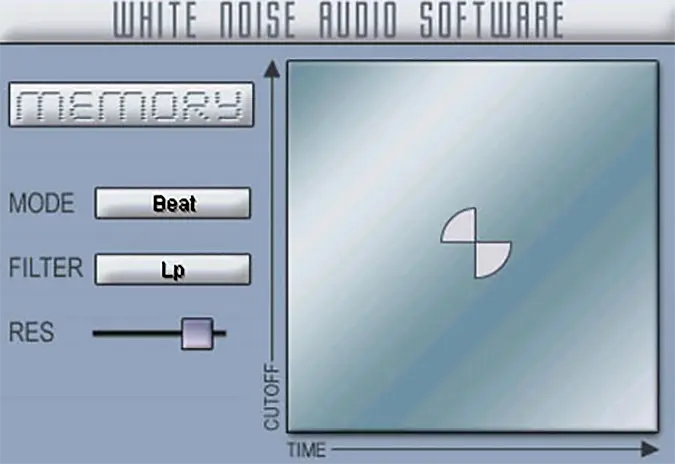
Memory by White Noise Audio is a real-time audio looper effect that captures incoming audio and lets you remix it on the fly. It records a section of your input signal and loops it continuously, giving you hands-on control over loop length and a built-in low-pass filter to shape the looped material.
The plugin centers around an XY pad interface that maps horizontal movement to loop length and vertical movement to filter cutoff. Pad movements are sent as automation parameters, so you can record expressive loop manipulations directly into your DAW timeline.
Memory also responds to MIDI note input for hosts that support sending notes to effect plugins. Each semitone above C2 or C3 triggers a different loop length value, opening up precise rhythmic control from a keyboard or MIDI controller.
The loop stays locked to your project tempo, keeping everything tightly in sync during production or performance.
Originally released in 2005, Memory was one of the earliest VST plugins to bring real-time audio looping into the DAW environment. It works best as an insert effect or a fully wet send, making it well suited for live remixing and beat deconstruction.
Frequently Asked Questions
How do I set up Memory in my DAW?
Insert Memory as an inline effect on the track you want to loop, or use it as a send effect set to 100% wet. Start playing audio into the track and click the XY pad to begin capturing and looping the input. Moving the pad horizontally changes the loop length while vertical movement adjusts the filter cutoff.
Can I trigger Memory with a MIDI controller?
Yes, if your DAW supports sending MIDI notes to effect plugins. Each semitone above C2 or C3 maps to a different loop length value, letting you switch between loop sizes from a keyboard or pad controller in real time.
Does Memory stay in sync with my project tempo?
Memory locks its loop playback to the host tempo, so loops remain rhythmically aligned with your project. This makes it reliable for live remixing and beat deconstruction without drift or timing issues.