
MXTune
Key Features
- Automatic pitch correction for recorded vocals
- Manual note editing for targeted pitch changes
- Key detection to keep correction aligned with the song
- Algorithm informed by Autotalent and SoundTouch
- Mouse-wheel zoom and navigation for the note editor
- Left-drag note creation and right-click note deletion
- 64-bit VST builds for Windows and Linux
Description
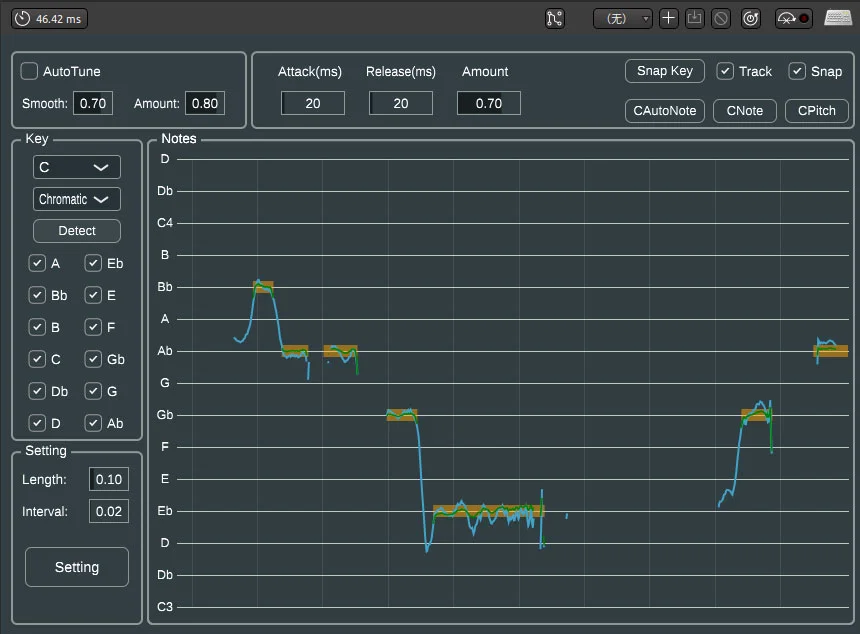
MXTune is a VST pitch-correction plugin from Liuanlin-MX for tuning recorded vocals and other pitched material. The developer describes it as free software for Windows and Linux in 64-bit VST format, with an algorithm based on Autotalent and SoundTouch.
Its workflow combines automatic tuning with manual correction, so you can start with a quick pass and then adjust individual notes when the result needs more control. Key detection is included to help constrain the correction to the musical context of the song.
The project’s public page documents mouse-driven editing shortcuts. Alt plus the mouse wheel zooms the note view horizontally, and Ctrl plus the wheel changes vertical zoom.
Regular or Shift-wheel gestures move around the view. Left-drag adds a note and right-click deletes one in the note editor, keeping basic correction work within the same focused view.
MXTune is best treated as a focused vocal-correction tool rather than a full vocal production suite. The public documentation identifies VST 64-bit support and points to GitHub releases.
Check the release page for the current build before installing, especially if your host expects a particular plugin folder or architecture.
Video Preview

Frequently Asked Questions
Which plugin format does MXTune provide?
The developer’s page identifies MXTune as a 64-bit VST plugin for Windows and Linux. The GitHub project also documents VST build and installation steps.
Does MXTune support manual tuning?
Yes. The public feature list includes both autotune and manual correction, and the editor supports adding notes by dragging and deleting them with the right mouse button.
What is key detection used for?
Key detection helps establish the musical context for pitch correction so the tuner can work against the notes of the song instead of treating every chromatic pitch as equally valid.
Where should I get the current build?
The developer page links to the MXTune GitHub releases page. Use that release route to check the available version and platform assets before installing.


