
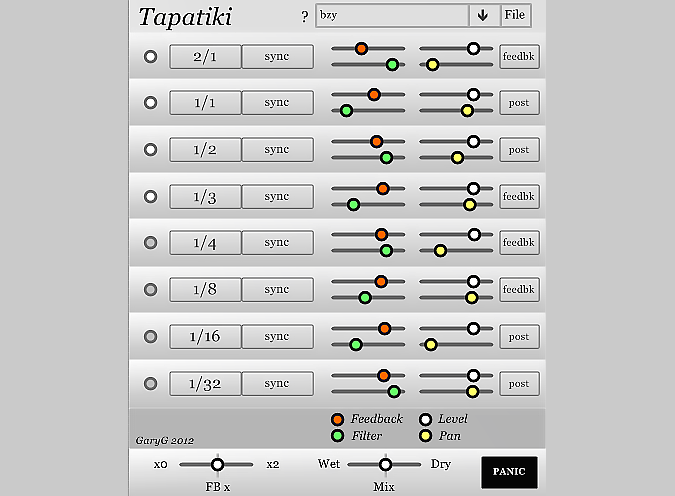
Tapatiki
Key Features
- Eight independent delay taps with per-tap level, pan, feedback, and filter controls for detailed rhythmic pattern creation
- Extensive tempo sync options from 2/1 to 1/64 with dotted and triplet subdivisions, plus non-synced delay times up to two seconds
- Combined low-pass and high-pass filter per tap with flexible routing inside or outside the feedback loop
- Global feedback multiplier (0x to 2x) for scaling all taps simultaneously, with a Panic button to kill runaway feedback
- Individual tap enable/disable for building patterns incrementally from simple echoes to complex polyrhythms
- Streamlined interface with click-anywhere sliders, right-click value setting, and zero dropdown menus
- Lightweight CPU footprint suited for stacking multiple instances across a mix
Description
Tapatiki is an 8-tap multi-tap delay plugin built for creating rhythmic delay patterns with minimal fuss. Originally developed by GaryG as an entry in the KVR Developer Challenge 2012, it provides eight independently configurable delay taps with tempo sync options ranging from 2/1 down to 1/64, including dotted and triplet subdivisions.
Each tap features its own level, pan, feedback, and filter controls, giving you precise command over how every echo behaves in the stereo field. The filter operates as a combined low-pass and high-pass design with a single knob, and can be routed either within the feedback loop for progressive tonal shaping or placed after it for static filtering.
A global feedback multiplier scales every tap's feedback amount simultaneously from zero (killing all repeats instantly) up to double their individual settings. Tapatiki has been internally tuned to prevent runaway feedback, but a dedicated Panic button is included for emergencies.
The interface prioritizes speed and directness over visual complexity. Sliders respond to clicks at any point along their travel, right-clicking any control jumps it to a specific value, and there are no dropdown menus anywhere in the plugin.
Taps can be individually disabled when not needed, making it easy to start with a simple slapback and gradually build toward complex polyrhythmic textures. Non-synced delay times up to two full seconds are also available for ambient and sound design work.
Frequently Asked Questions
Can Tapatiki sync its delay taps to my DAW's tempo?
Yes. Tapatiki offers a full range of tempo sync subdivisions from 2/1 down to 1/64, including dotted and triplet values. You can also bypass sync entirely and set delay times manually up to two seconds per tap.
What does the filter routing option do in Tapatiki?
Each tap has a combined low-pass and high-pass filter that can be placed either inside or outside the feedback loop. Routing the filter inside the loop causes each repeat to lose more high or low frequencies progressively, simulating analog-style decay. Placing it after the loop applies the same filtering to all repeats uniformly.
Is Tapatiki available in 64-bit or for macOS?
Tapatiki is currently available as a 32-bit VST plugin for Windows only. There is no 64-bit or macOS version. You can run it inside a 64-bit DAW using a 32-bit bridge like jBridge or the built-in bridging in some hosts.


