
TheMachine
Key Features
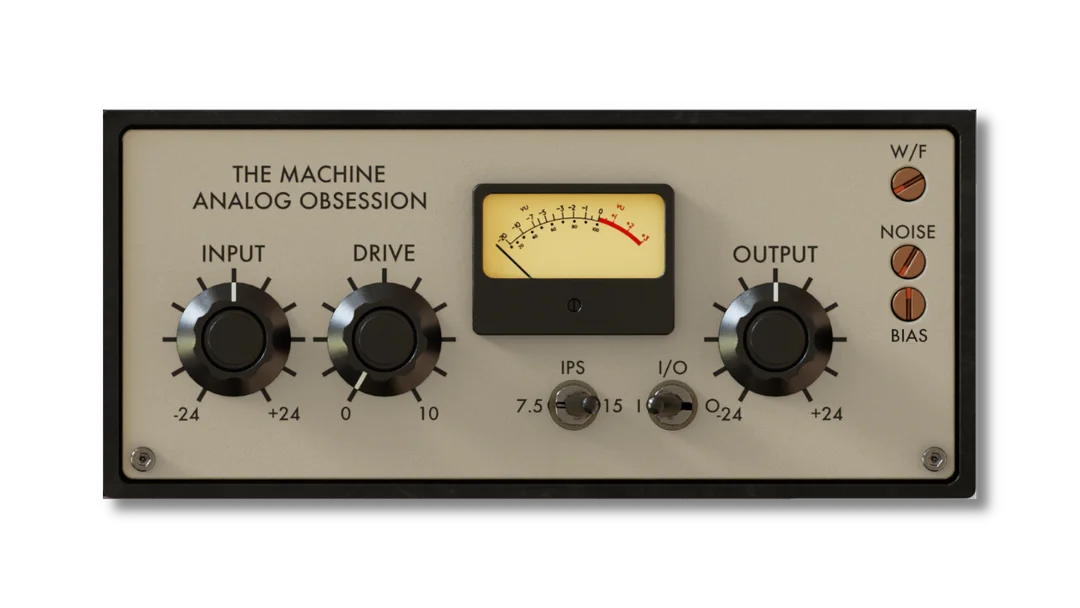
- Drive control pushes the modeled circuitry for adjustable internal saturation.
- Gain-compensated input and clean output controls support level management.
- Switch between 7.5 and 15 IPS tape speeds.
- Wow and flutter control introduces tape-like modulation.
- Adjustable noise and bias shape the tape-machine character.
- Bypass switch makes direct comparisons straightforward.
- Resizable interface scales from 50% to 200%.
Description
TheMachine by Analog Obsession is a vintage tube-driven tape machine effect for adding saturation and tape character to tracks and buses. Its compact controls bring input gain, drive, tape speed, modulation, noise and bias into one interface.
INPUT adjusts the signal with gain compensation, while DRIVE pushes the modeled circuitry for more internal saturation. OUTPUT provides clean level adjustment, making it easier to compare the processed sound with the bypassed signal at a useful level.
Choose between 7.5 and 15 inches per second with the IPS switch, then adjust wow and flutter to introduce tape-like movement. The NOISE control adds noise between -120 and -40 dB, and BIAS adjusts the tape machine bias.
The interface resizes from 50% to 200% using its bottom-right handle. Analog Obsession notes that duplicated instances retain the current size; save a resized default preset in your DAW if you want newly loaded instances to open at that size.
Version 1.0 is available for macOS and Windows in VST3 and AAX Native/AudioSuite, with AU also available on macOS. Production Expert describes it as a quick way to add tape color, while noting that its limited speed and calibration choices offer less detailed control than some alternatives.
Frequently Asked Questions
What does the Drive control do?
Drive pushes the internal circuitry to adjust saturation. The clean output control can then be used to set the resulting level.
Can TheMachine add tape movement and noise?
Yes. The W/F control simulates wow and flutter, and the noise control adds noise from -120 to -40 dB.
Which tape speeds are available?
The IPS switch selects 7.5 or 15 inches per second. The developer does not list a 30 IPS setting.
How can I keep my preferred interface size?
Drag the bottom-right handle to resize the interface, then save that state as your DAW default preset. Duplicated instances retain their current size, but newly loaded instances otherwise open at the default size.


