
Tonespace
Key Features
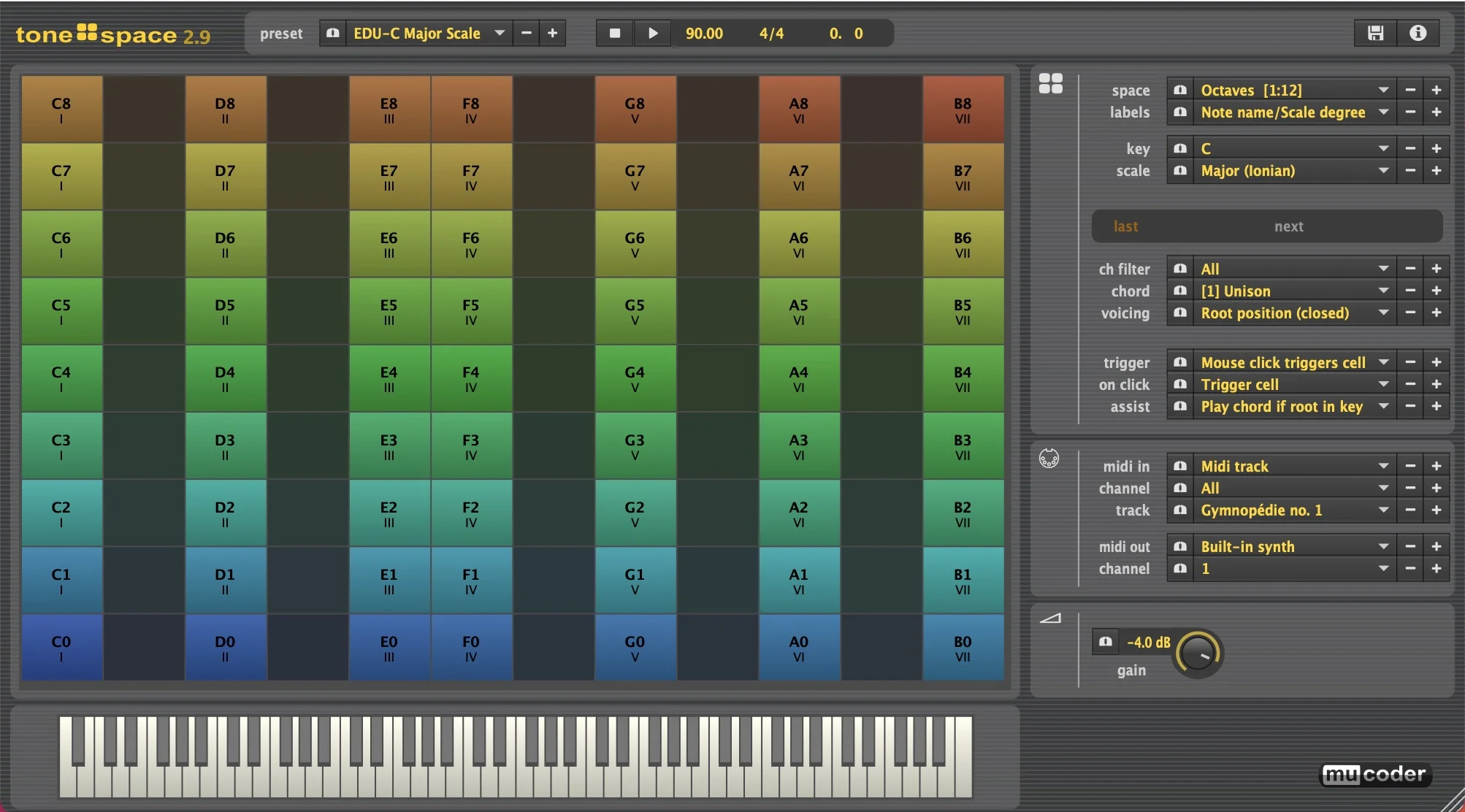
- Visual chord and scale grid makes harmonic relationships easier to explore by ear and by shape.
- Supports 39 chord types, 25 voicings or inversions, 21 scales, 18 keys, and 50 grid layouts.
- Displays the active chord on a piano keyboard alongside the grid view.
- Accepts monophonic MIDI input to trigger or view chords from a controller or DAW track.
- Chord-fitting algorithms generate candidates that conform to the selected scale and key.
- Outputs MIDI chords to external instruments for recording and arrangement work.
- Runs as a VST or Audio Unit plug-in, or as a standalone application.
Description
Tonespace is a MIDI chord generator and visualizer from Mucoder that turns scales, chord shapes, and voicings into a playable grid. Use the grid or a MIDI keyboard to audition harmony, then send the generated MIDI to a synth or other instrument in your DAW.
Rather than presenting theory as a conventional piano-roll task, Tonespace maps notes onto more than 50 grid layouts and shows the active chord on a keyboard. Its 39 chord types, 25 voicings or inversions, 21 scales, and 18 keys make it useful for trying harmonic movement while keeping the relationships visible.
Single-note MIDI input can trigger or display chords, and the chord-fitting modes can choose candidates that fit the selected scale and key. That makes it a practical sketchpad for producers who want to explore progressions by ear, or for learners who want to connect a chord’s shape to the notes it contains.
Tonespace works as a VST or Audio Unit plug-in and as a standalone app, with current v2.9 downloads for Windows, macOS, and Linux. The developer’s page explicitly describes it as free, with direct 64-bit downloads for all three platforms.
Video Preview

Frequently Asked Questions
Does Tonespace generate audio on its own?
Tonespace is primarily a MIDI chord tool: it can output generated chords to a synth or other instrument. The developer also provides a standalone application, but its plug-in workflow is designed around MIDI input and output.
How can I trigger chords in Tonespace?
You can audition chords from the on-screen grid or use a traditional MIDI keyboard. The developer also documents single-note MIDI input modes for triggering or viewing chords.
Can Tonespace keep generated chords in a key or scale?
Yes. Select a key and scale, then use the chord-fitting options to choose candidate chords that fit that selection. It also provides manual chord and voicing choices when you want more direct control.
Which platforms and plug-in formats does Tonespace support?
The official v2.9 page lists Windows, macOS, and Linux downloads, and identifies Tonespace as available as VST, AU, or a standalone app. Its downloads are labeled 64-bit.


