
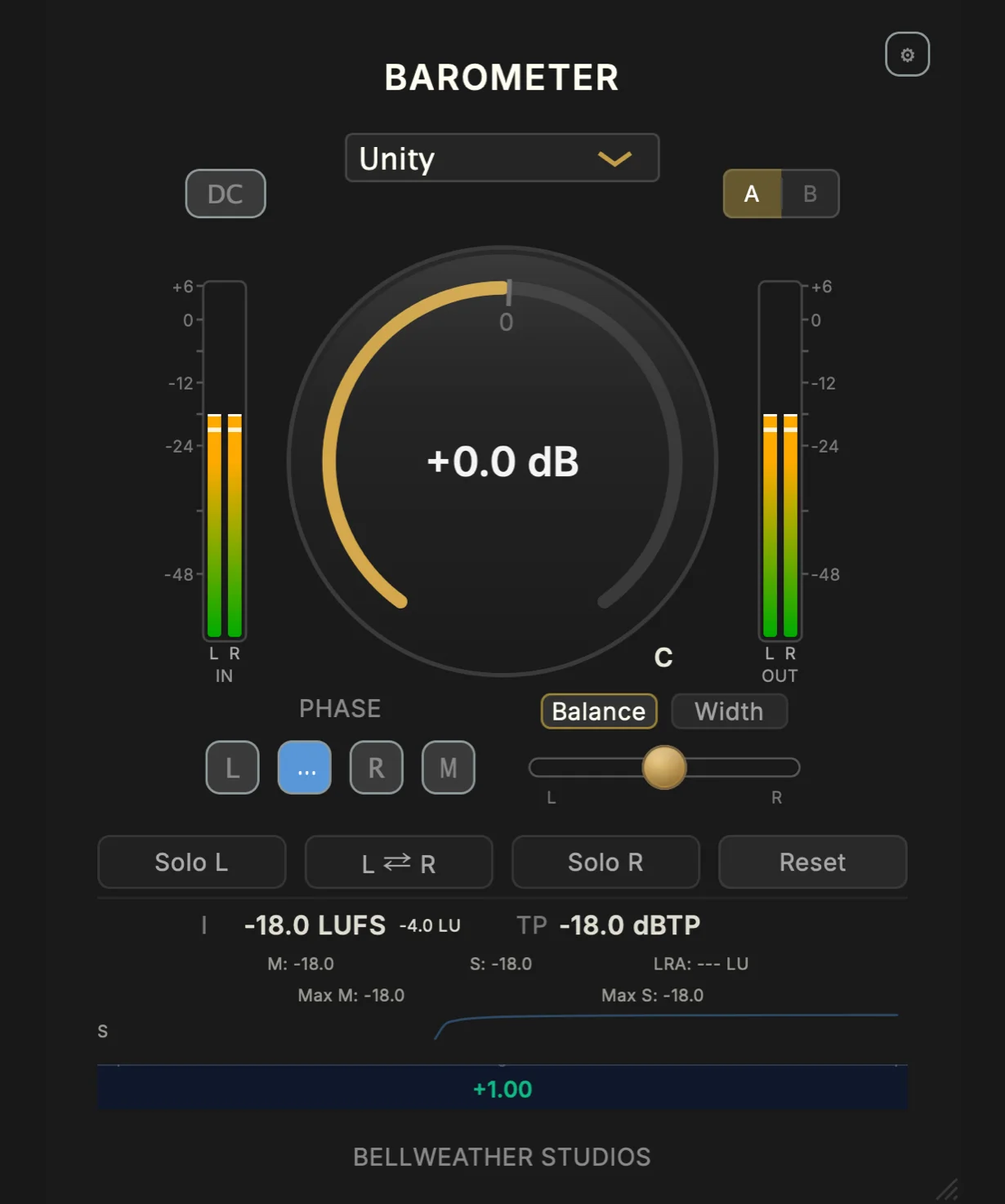
Barometer
Key Features
- Combines gain staging, output trim, stereo utility controls, and loudness metering in one zero-latency insert.
- Provides a -96 to +24 dB gain range, with Shift-drag access to a separate output Trim control.
- Measures momentary, short-term, and integrated LUFS alongside true peak and loudness range.
- Offers linked or per-channel phase flips, plus balance, width, mono, channel-swap, and left/right solo tools for stereo checks.
- Includes DC filtering to remove offset before evaluating level and stereo behaviour.
- Supplies ten presets and instant A/B comparison for repeatable meter and utility setups.
- Runs as VST3, AU, AAX, or CLAP according to the supported operating system.
Description
Barometer is a zero-latency gain-staging, stereo-utility, and loudness-metering plug-in from Bellweather Studios. It puts gain and output trim alongside LUFS, true-peak, and loudness-range readouts, so you can assess a signal and make basic level or stereo corrections without inserting a separate processor for each job.
The main gain control covers -96 to +24 dB, while Shift-dragging exposes a separate output Trim control. For stereo checking, the plug-in provides per-channel phase flip with linking, balance and width adjustment, mono compatibility checking, left/right solo, channel swapping, and DC filtering.
Barometer reports momentary, short-term, and integrated LUFS, true peak, and loudness range. It also includes ten presets and instant A/B comparison, making it useful for matching sources, watching delivery headroom, or checking a mix's stereo behaviour while it plays.
Bellweather lists Barometer v1.4.2 at $0 and delivers it through its Weather Station workflow. It supports macOS 11.0 or later in VST3, AU, AAX, and CLAP; Windows 10 or later in VST3; and Linux Ubuntu 24.04 or later in CLAP.
Frequently Asked Questions
What does Barometer combine in one plug-in?
Barometer combines gain and output trim with LUFS, true-peak, and loudness-range metering. It also includes practical stereo utilities such as phase inversion, balance, width, mono checking, channel solo, and channel swapping.
How do I change output level separately from the main gain?
Bellweather places output Trim behind the main gain control. Hold Shift while dragging the main knob and the central readout changes to Trim, allowing an independent output adjustment.
Which loudness readings does Barometer show?
It shows momentary, short-term, and integrated LUFS, together with true peak and loudness range. The product page presents these as in-session monitoring tools rather than a separate metering-only workflow.
Can Barometer help check stereo compatibility?
Yes. You can solo either side, alter balance and width, and check the result in mono. Per-channel phase flip, linked phase operation, and channel swapping give additional ways to diagnose the relationship between left and right.


