
Crossfeed
Key Features
- Crossfeed processing blends the left and right channels into the opposite ear to create a more speaker-like headphone image
- Width and Focus controls help narrow, center, or preserve the stereo field without turning the plugin into a one-knob widener
- Wet/Dry mix, cutoff, feedback, and high-shelf compensation give detailed control over how much processing reaches the monitoring chain
- Modern and Direct processing modes cover subtle assisted setup and more traditional hands-on crossfeed adjustment
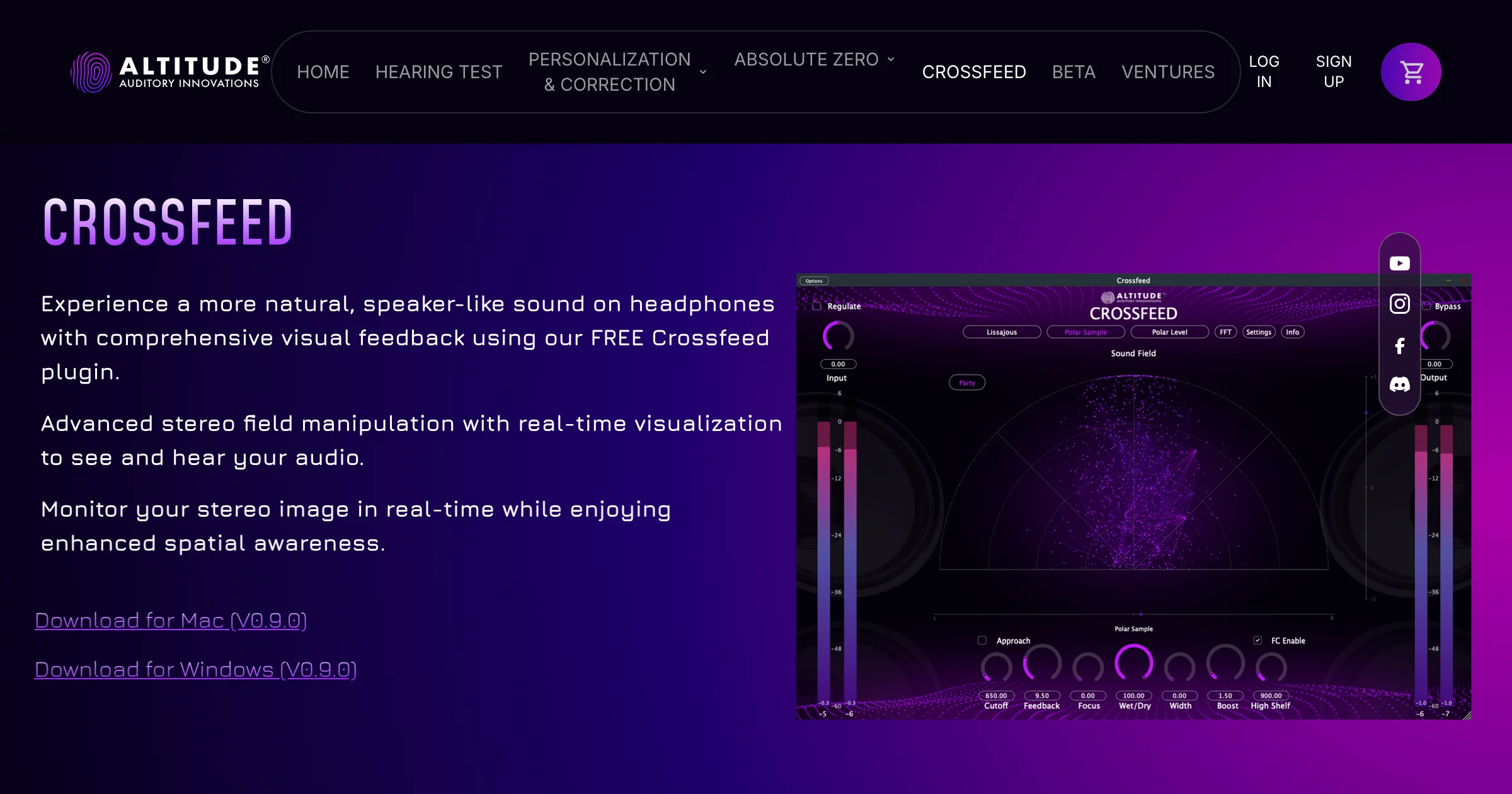
- Built-in Lissajous, polar sample, polar level, and FFT views make phase, width, and spectral balance visible while monitoring
- Standalone app and DAW plugin support let the same monitoring setup work inside a session or through a routed system audio chain
Description
Crossfeed by Altitude Audio is a headphone monitoring plugin and standalone app that makes stereo playback feel closer to listening on speakers. It blends controlled amounts of each channel into the opposite ear, reducing the hard left-right separation that can make headphone mixing feel unnatural.
The plugin is built for practical monitoring rather than dramatic widening. Width, Focus, Wet/Dry, cutoff, feedback, and high-shelf controls let you decide how much crossfeed is applied and how much top-end compensation is needed after the channels are blended.
Its strongest differentiator is the visual feedback layer. Crossfeed combines the listening processor with a Lissajous vectorscope, polar sample and level views, and FFT spectrum analysis, so you can watch phase relationships, stereo balance, and spectral movement while judging the headphone image.
BPB's launch coverage notes that speaker emulation on headphones is never exact, but it also highlights the value of Crossfeed's adjustable processing and monitoring views. That makes it a useful utility for producers who mix on headphones and want a less fatiguing reference before checking decisions on monitors.
Frequently Asked Questions
Should Crossfeed be left on when exporting a mix?
Crossfeed is a monitoring tool, so it should normally sit on a monitor or headphone bus and be bypassed before printing the final mix. Its job is to help you judge pan, width, and fatigue on headphones rather than become part of the rendered master.
What is the difference between Modern and Direct mode?
Altitude describes Modern mode as a refreshed approach that simplifies the way parameters interact for a more subtle result. Direct mode is closer to a traditional crossfeed workflow and is better when you want more pronounced manual control.
Can the standalone app process all computer audio?
The standalone version can be used outside a DAW, but Altitude notes that system routing requires a virtual audio driver. The product page points users toward tools such as BlackHole, VB-Cable, or Loopback for routing audio into the standalone app.


