
HiPan
Key Features
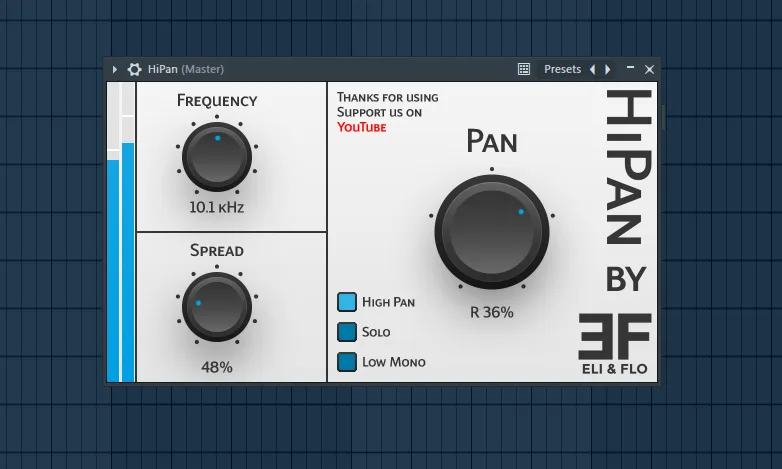
- Independent high- and low-frequency panning for separating stereo moves by band
- Adjustable crossover frequency for choosing where the low and high sections split
- Stereo Spread control for widening material without rebuilding a routing chain
- Low Mono mode for keeping bass and 808 fundamentals focused in the center
- Solo monitoring for checking each band before finalizing the pan position
- Lightweight utility workflow aimed at quick mix fixes and automation moves
- Single itch.io package covering Windows VST3 plus macOS VST3 and AU builds
Description
HiPan by Eli & Flo is a lightweight band-split panning utility for moving the highs and lows of a signal independently. Instead of building a multiband routing chain just to keep bass centered while shifting the top end, you get the core controls in one small plugin.
The workflow is built around practical stereo placement rather than deep spatial sound design. Use it to lock 808s, bass guitars, and low synth fundamentals in the middle while widening or offsetting the brighter attack, noise, percussion, or synth detail above the crossover.
HiPan also includes a Stereo Spread control, Low Mono mode, and solo monitoring for checking each band before committing the move. That makes it useful for quick mix fixes, bass-heavy production, and small automation moves where only the upper frequencies should travel across the stereo field.
The official itch.io page lists HiPan as free forever and provides a single download package for Windows and macOS. Windows users get VST3, while the macOS package includes VST3 and AU formats.
Frequently Asked Questions
What problem does HiPan solve?
HiPan lets you pan high and low frequency ranges separately, which is useful when the top end needs width or movement but the low end should stay centered. It is a faster option than setting up manual multiband routing for simple split-panning tasks.
What does Low Mono mode do?
Low Mono mode is designed to keep the low-frequency band focused in the center. That is useful on bass-heavy sources where off-center low end can make a mix feel unstable or less compatible in mono.
Is HiPan more of a mix utility or a creative effect?
It can work as both, but the control set is built around quick utility moves. The most practical uses are fixing stereo balance, widening highs over centered lows, and automating upper-band movement without moving the whole sound.
How is HiPan installed?
The official page says Windows users copy HiPan.vst3 into the common VST3 folder. On macOS, the download includes an installer package and the page notes the standard Privacy & Security open-anyway step if macOS blocks the installer.


