
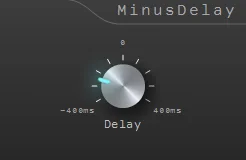
MinusDelay
Key Features
- Moves a selected track earlier with negative delay values or later with positive values.
- Uses the DAW's delay-compensation system to make forward timing shifts possible.
- Covers a -400 ms to +400 ms range for practical fixed timing offsets.
- Keeps the correction on the insert channel, avoiding manual movement of arrangement clips.
- Includes VST3 and VST2 builds for Windows plugin folders.
- Supports 32-bit and 64-bit installation paths documented by Bakuage.
Description
MinusDelay is a Bakuage timing utility for Windows that shifts a track either later or earlier, rather than acting as a conventional echo effect. Its distinctive negative-delay setting uses the host DAW's delay-compensation engine to bring a source forward relative to the rest of the session, while positive values work as ordinary delay offsets.
The practical use is time alignment: move a late-sounding instrument, a layered part, or a problem track without moving every clip around on the arrangement grid. The control spans -400 ms to +400 ms, making it a simple corrective option when a project needs a fixed timing nudge rather than a creative repeat effect.
Negative settings depend on plugin delay compensation being enabled in the DAW, so results are host-dependent and should be checked in context. The included documentation supplies both VST3 and VST2 installation paths, with 32-bit and 64-bit variants for older Windows-based plugin setups.
MinusDelay is most useful as a focused utility, not a substitute for detailed multi-mic phase analysis or a DAW's native track-delay feature where one is available. Its appeal is a direct, repeatable per-track offset that can be saved with the session instead of manually repositioning source material.
Frequently Asked Questions
What does a negative delay setting do in MinusDelay?
A negative setting brings the inserted track forward relative to the rest of the session by using the DAW's delay-compensation system. A positive setting instead works as a normal delay offset.
Why might MinusDelay not move audio forward in my DAW?
The developer states that delay compensation must be enabled for negative values to work. Host behavior can differ, so verify the result in a test project before relying on an offset in a mix.
What delay range does MinusDelay provide?
The Bakuage release announcement lists a range from -400 ms to +400 ms. That makes it suitable for fixed timing correction as well as ordinary positive delay offsets.
Which plugin formats are included?
The official manual documents VST3 files and fallback VST2 DLL installation paths. It also lists separate 32-bit and 64-bit Windows locations.


