
Signature Delay
Key Features
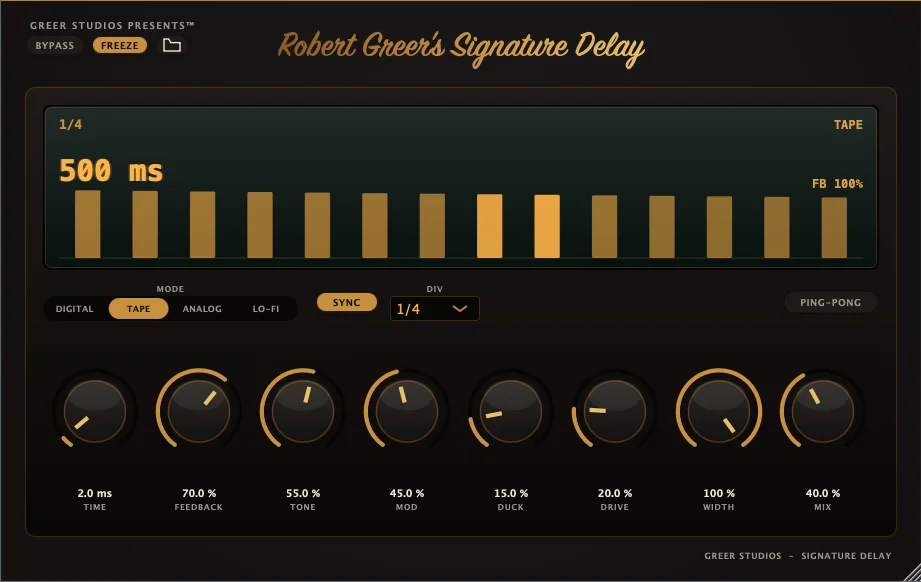
- Four delay modes cover clean digital repeats, tape-style color, analog tone, and dirtier lo-fi echoes.
- Built-in ducking keeps repeats underneath the dry signal and lets them rise naturally between phrases.
- Ping-pong mode creates stereo delay throws without needing a separate routing setup.
- Freeze holds the delay indefinitely for transitions, drones, and sound-design moments.
- Tempo sync and note divisions make rhythmic echoes easy to lock to a session.
- Tone, drive, modulation, stereo width, feedback, mix, and bypass controls cover the main shaping moves without menu diving.
Description
Signature Delay is a Windows delay effect and standalone app built around four repeat characters: Digital, Tape, Analog, and Lo-Fi. It covers clean tempo-locked echoes, grittier delay colors, stereo throws, and held feedback textures without turning the interface into a deep multi-effect workstation.
Its standout workflow feature is ducking, which pulls the repeats down while the dry signal is active and lets them swell back into the gaps. That makes it useful for vocal throws, lead lines, risers, and sound-design layers where the delay needs movement but the source still has to stay readable.
The core controls cover tempo sync, note divisions, feedback, mix, tone, drive, modulation, stereo width, ping-pong, freeze, and bypass. Freeze can hold the delay indefinitely, while the mode switch gives the same timing setup several different tonal directions.
The current limitation is platform support and delivery. The release is Windows-only in VST3 and standalone formats, with a macOS version planned, and the download link is delivered by email rather than a public direct file.
Frequently Asked Questions
What makes Signature Delay different from a basic delay plugin?
The key difference is the combination of four delay characters with built-in ducking, ping-pong, and freeze. That gives it both practical mix utility and more animated sound-design options than a plain single-mode delay.
How does the ducking control help in a mix?
Ducking lowers the delayed signal while the dry source is present, then lets the repeats come back in the spaces. This is useful on vocals, leads, and effects because the delay can stay audible without masking the original part.
Can Signature Delay be used outside a DAW?
Yes. The developer lists it as both a VST3 plugin and a standalone app, so Windows users can run it in a compatible DAW or use the standalone version.


