
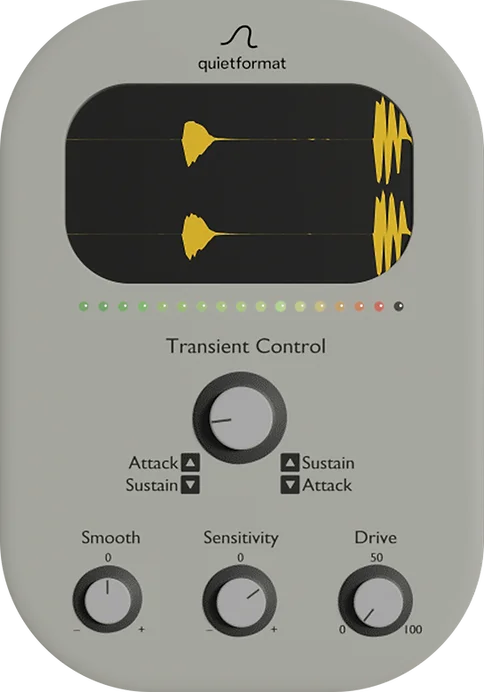
Transient Control
Key Features
- Single main transient control balances sharper attack against smoother sustain without separate compressor-style setup.
- Sensitivity control adapts transient detection to drums, loops, plucked instruments, and mixed source material.
- Context-aware Smooth control softens the attack or sustain behavior depending on the main knob direction.
- Drive control adds subtle saturation, density, and presence after the transient shaping stage.
- Extreme attack-side settings can create a soft yet tight texture that goes beyond basic punch enhancement.
- macOS and Windows support with VST3 on both platforms and AU on macOS.
- Lightweight interface focused on fast punch, tail control, and transient cleanup decisions.
Description
Transient Control is a minimalist transient shaper from Quietformat for reshaping attack, sustain, and density without a full dynamics rack. Its main control moves left for sharper attack with shorter tails, or right for smoother attack with longer sustain, making it fast to tighten drums, add body, or rebalance percussive loops.
The secondary controls keep the plugin simple while giving enough range for different sources. Sensitivity adjusts how the detector reacts, Smooth changes the softness of the shaping depending on the main knob direction, and Drive adds saturation for extra warmth and presence.
That layout makes Transient Control useful when a conventional compressor feels too threshold-dependent or slow to set up. It is especially practical on drums, percussion, plucked instruments, and loop material where the goal is quick punch, cleaner tails, or a softer transient edge rather than detailed multi-band dynamics.
Quietformat also documents an extreme setting with the main knob at -100 and both Smooth and Sensitivity pushed high for a velvety but tight attack texture. The official page continues to label the plugin FREE, with downloads delivered through an email and newsletter signup form.
Video Preview


Frequently Asked Questions
Is Transient Control a compressor?
No. It shapes the perceived attack and sustain of a sound rather than reducing level after a threshold like a typical compressor. That makes it faster for tightening drum hits, shortening tails, or adding body when you do not need full compression controls.
What does the main knob do?
Turning it left emphasizes the attack and shortens sustain. Turning it right brings out sustain while smoothing the initial attack.
How does the Smooth control behave?
Quietformat says Smooth changes direction depending on the main transient setting. Toward sustain, turning Smooth left creates a softer feel; toward attack, turning Smooth right creates a softer feel.
Why is the download linked externally?
Quietformat provides the plugin through an email and newsletter signup form. There is no ungated direct installer URL, so the download links to the official product page.


