
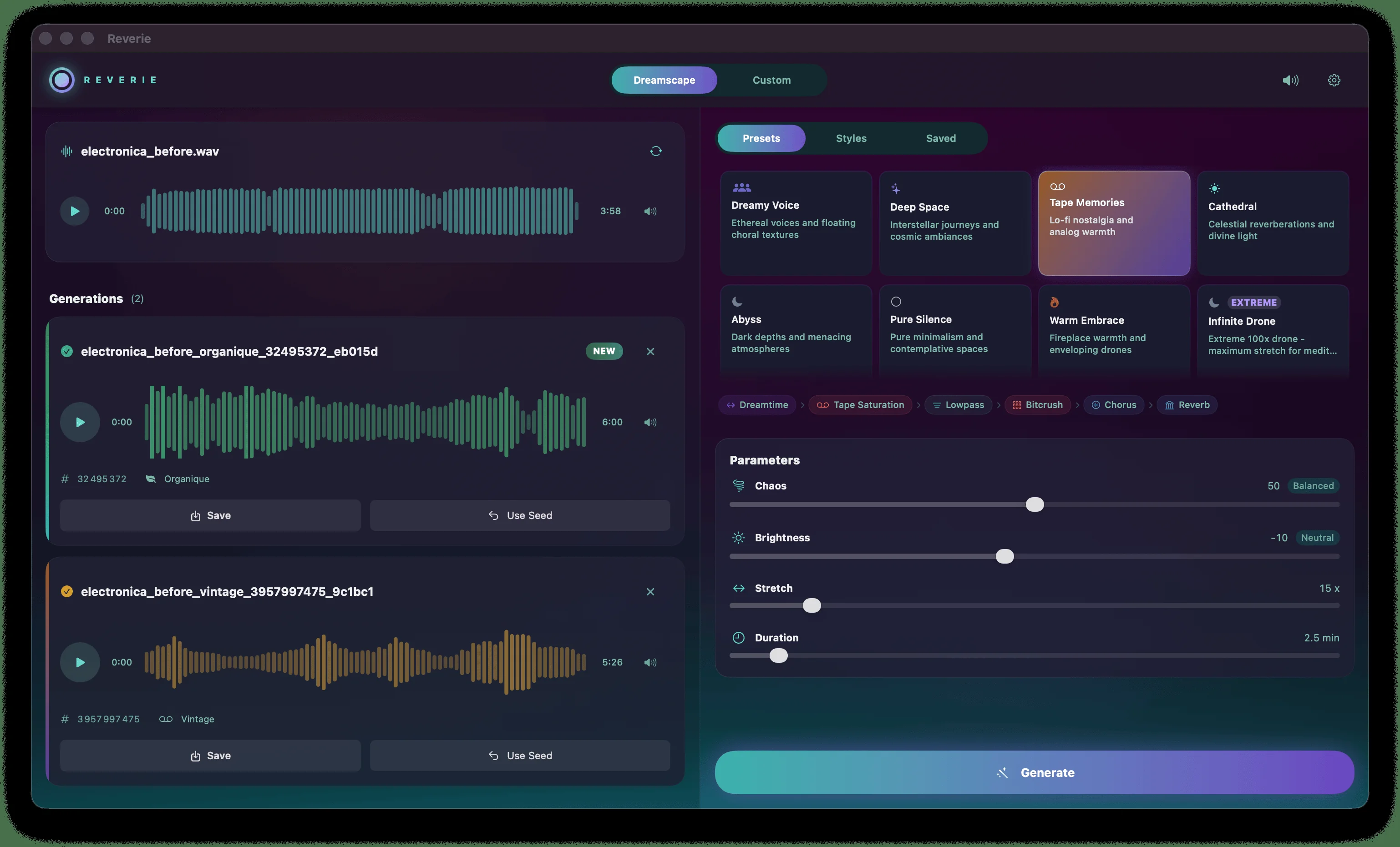
Reverie
Key Features
- Chains 37 DSP modules — phase-vocoder time-stretching, spectral freezing, formant shifting, shimmer reverb, and granular processing — so renders keep evolving instead of freezing into a static drone
- Dreamtime engine extends Paul Nasca's Paulstretch research to stretch audio up to 100x, turning a one-minute clip into hours of ambient texture
- 22 style families and 20 factory presets for one-click generation in Dreamscape mode, plus a visual Pro Chain Builder for hand-assembling custom module chains
- USeed system generates a portable code for every render, letting you reproduce a result byte-for-byte or tweak it into new variations
- Accepts WAV, MP3, FLAC, M4A, OGG, and AIFF input; exports WAV on the free tier, with FLAC, OGG, and AIFF at 16/24-bit added on Pro
- Runs fully offline after activation, with no cloud upload of source audio and no account required for the free tier
- Native builds for macOS (Apple Silicon and Intel), Windows, and Linux, with one license covering all three platforms
Description
Reverie is a standalone desktop app that turns any audio file into a long, continuously evolving ambient soundscape. Drop in a vocal take, a stem, or a field recording, pick a style, and it renders a texture that never repeats.
Under the hood it chains 37 DSP modules — phase-vocoder time-stretching, spectral freezing, formant shifting, and shimmer reverb among them — so a render keeps shifting instead of settling into one frozen drone.
The core stretch engine, called Dreamtime, extends Paul Nasca's original 2006 Paulstretch research into a deeper module chain with 20 curated presets and a visual Pro Chain Builder for hand-assembling effects.
Every render also carries a portable "USeed" code that captures the exact chain and parameters used, so a favorite result can be reproduced exactly or nudged into a fresh variation.
The free tier caps renders at 3 minutes and exports WAV only, with no account required. The one-time paid Pro tier removes the cap up to 30 minutes and unlocks all 37 modules plus FLAC, OGG, and AIFF export.
Reverie runs natively on macOS, Windows, and Linux as a standalone app — there's no VST, AU, or CLAP version, though rendered files drop straight into any DAW afterward.
Frequently Asked Questions
How is Reverie different from PaulXStretch?
Reverie's stretch engine, Dreamtime, is built on the same Paulstretch research Nasca published in 2006, but it runs as one module inside a chain of 37, with 20 curated presets and a Pro Chain Builder for combining effects. PaulXStretch stays a leaner, single-purpose open-source stretcher that also runs as a DAW plugin, while Reverie is a standalone app only.
Does Reverie work as a plugin inside a DAW?
No, Reverie is a standalone application, not a VST, AU, or CLAP plugin. Rendered files export as WAV, FLAC, OGG, or AIFF and drop straight onto a DAW timeline afterward.
What's the difference between the free and Pro versions?
The free tier renders up to 3 minutes per clip, includes 5 Lite presets, and exports WAV only with no account required. The one-time Pro purchase removes the time cap up to 30 minutes, unlocks all 22 styles and 37 modules, and adds FLAC, OGG, and AIFF export.
Can I reproduce a render I liked?
Yes, every generation outputs a portable USeed code that captures the full module chain and parameters used. Pasting that code back in on any machine reproduces the exact same soundscape.
What kind of source audio works best?
Sparse, harmonic material like vocals, pads, or solo instruments produces the cleanest ambient textures, while dense full mixes smear into more textured atmospheric beds. Both work, but simpler sources give more defined results.


