TapeStop
Key Features
- Independent stop and start time controls adjustable up to 2 seconds each for precise effect shaping
- Beat-synced snap function locks effect duration to note divisions from whole notes to 1/32 for tempo-tight transitions
- Automatic timeline re-alignment ensures audio stays perfectly in sync after the effect completes
- Balanced frequency response during slowdown avoids the low-end dominance common in other tape-stop plugins
- Trigger-based operation eliminates the need for manual automation curves
- Lightweight single-purpose design with minimal CPU footprint and instant loading
Description
TapeStop by EAS Audio recreates the classic pitch-bending slowdown and speed-up effects heard when stopping or starting a reel-to-reel tape machine. It delivers that signature tape-stop sound used in countless EDM drops, hip-hop transitions, and cinematic builds — all without needing an actual tape deck.
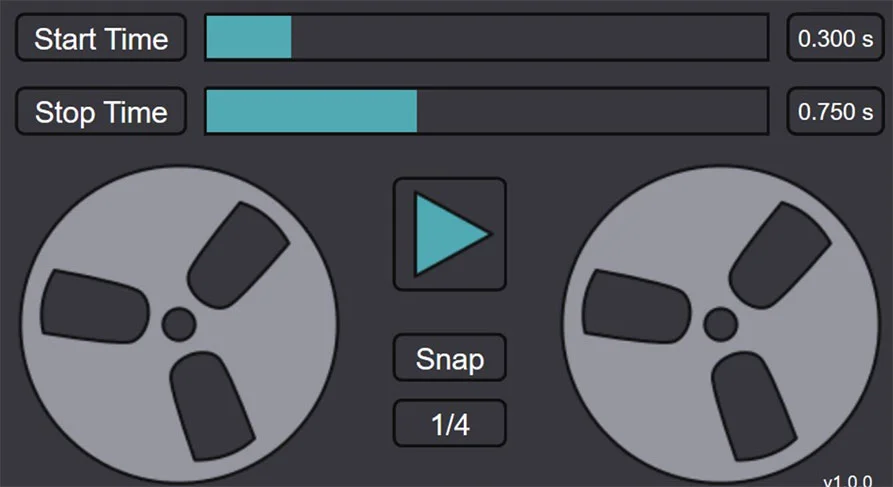
The plugin provides independent control over stop and start times, each adjustable up to two seconds. A snap-to-grid function locks these durations to beat divisions ranging from whole notes down to 1/32 notes, keeping the effect tight and rhythmic within your project.
Unlike a real tape machine, TapeStop keeps your audio perfectly aligned with the project timeline after the effect completes. There is no drift or manual re-alignment needed — playback resumes exactly where it should be, which makes it practical for complex arrangements where timing is critical.
Users consistently praise TapeStop for producing a smooth, balanced slowdown that avoids over-emphasizing low frequencies. Where some tape-stop effects let the kick or bass dominate the spindown, this plugin maintains an even frequency response throughout the pitch drop, resulting in a more musical and polished transition.
TapeStop is a single-purpose utility with a minimal interface — stop time, start time, a play/stop toggle, and snap controls. It loads instantly and uses negligible CPU, making it the kind of plugin you drop on a bus, trigger once, and forget about.
Video Preview

Frequently Asked Questions
Does TapeStop work in DAWs other than Reaper and Ardour?
TapeStop works in any DAW that supports VST3 plugins, including FL Studio, Ableton Live, Bitwig, Cubase, and Studio One. Early versions had compatibility issues in some hosts, but v1.0.2 resolved most of these. Make sure to copy the entire TapeStop.vst3 folder (not just a single file) into your VST3 directory.
Can I control when the tape stop triggers during playback?
Yes. TapeStop uses a trigger-based system — you automate the play/stop button in your DAW to activate the effect at the exact moment you want. The snap function lets you lock the effect duration to beat divisions, so the slowdown or speed-up lands precisely on the beat.
Does the plugin cause latency or timing drift in my project?
TapeStop automatically re-aligns audio with the project timeline once the effect completes. Your tracks resume exactly in sync without any manual adjustment. Early versions had a latency compensation issue in some hosts, but this was addressed in the v1.0.2 update.
What is the difference between the stop time and start time controls?
Stop time controls how long it takes for audio to slow down to a complete halt, simulating a tape machine being stopped. Start time controls how long it takes to ramp back up to full speed, simulating the tape being restarted. Both are independently adjustable up to 2 seconds.